Researching your podcast hosting options and looking for a Podbean alternative? Do you want to see exactly how Castos and Podbean stack up? We’re giving you a straightforward look at how Castos’ features compare to what Podbean has to offer.
Castos Features Compared To Podbean
Castos is a strong alternative to Podbean for podcast hosting. Here's exactly how the two platforms compare.
Manage Multiple Podcasts From One Account
Learn MoreCastos
Unique RSS feeds created for every new podcast series. Manage multiple podcasts from **one account for a fixed price**.
Podbean
Restricted to 2 podcasts within one account.
Multiple podcasts are only supported on a higher-tier Business Plan.
WordPress Plugin
Learn MoreCastos
Use Seriously Simple Podcasting to manage your podcast directly from WordPress. Publish episodes, customize the embeddable player, and view analytics from one dashboard.
Podbean
Plugin only creates an embeddable player. Podcast management requires toggling to Podbean's dashboard.
Automatically Convert & Publish Podcast To YouTube
Learn MoreCastos
Use Automatic YouTube Republishing to convert audio episodes into video files and publish them to YouTube.
Podbean
Manually publish podcast to YouTube. Podbean can host video files on higher-tier plans.
Episode Transcriptions
Learn MoreCastos
Included free on every plan, with a generous monthly allowance.
Podbean
Feature not currently supported by Podbean.
Upload & Bandwidth Limits
Learn MoreCastos
Unlimited upload time and unlimited podcasts across all plans.
Podbean
Unlimited upload time and bandwidth across all paid plans.
Use Your Own Domain Name For RSS Feed Link
Learn MoreCastos
RSS feed URL can be based on your current domain name for free.
Podbean
RSS feed URL can be based on your current domain name across all paid plans.
Advanced Analytics For Every Plan
Learn MoreCastos
View listens by episode, geographic breakdowns, and listens by device and platform on every plan.
Podbean
View listens by episode, geographic breakdowns, and listens by device and platform on every paid plan.
Host Multiple Shows For One Low Price
Castos doesn’t believe in limiting your creative process so all of our plans include hosting multiple podcasts under one account, period. Upload as many hours as you want and rest easy knowing your audience will always be able to download your latest content.
You’ll have the freedom to experiment with new concepts, produce multiple shows, and podcast until your heart’s content with Castos. We prefer that you grow your podcast without worrying about limitations and unexpected costs.
With Podbean, you’re restricted to hosting a maximum of two podcasts within one account, and multiple-podcast support is gated behind a higher-tier Business Plan at a significant monthly cost.
What Castos and Podbean Have In Common
Both platforms include:
Advanced Podcast Analytics
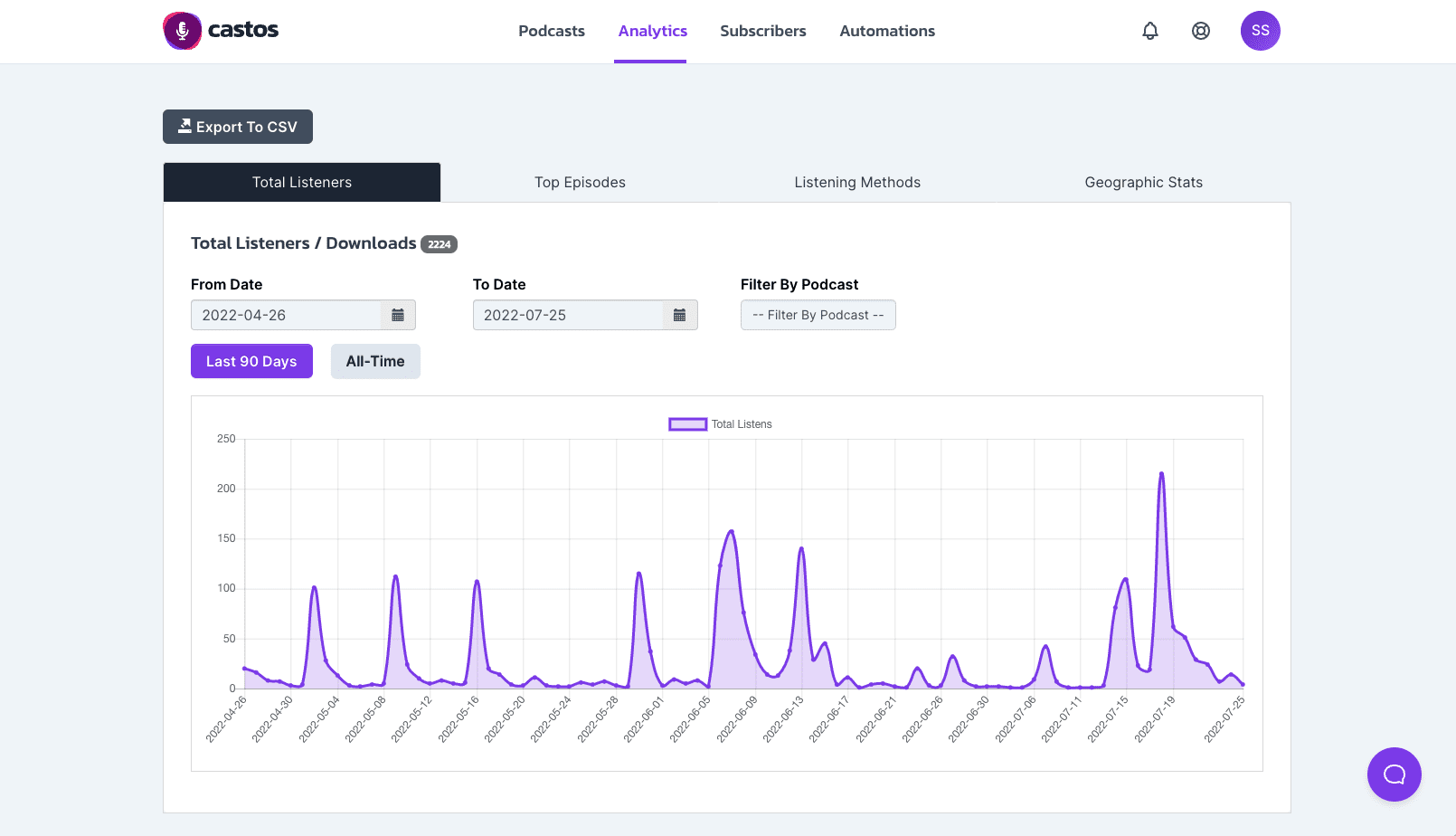
Customizable Podcast Websites and Themes
Automatic Distribution To All Major Podcasting Directories
One-Click Import of Your Existing Podcast From Podbean
But the platforms differ in one key aspect: price predictability. Podbean’s entry-level plan starts lower than Castos’ Essentials plan at $19/month, but here’s where additional costs can add up with Podbean:
Scenario: Publish 4x 60-minute episodes per month, use your own domain for RSS
- Castos Essentials — $19/month (everything included)
- Podbean — entry plan covers this, but custom domain availability varies by plan
Scenario: Manage two podcasts, publish 2x 60-minute episodes per month per podcast
- Castos Essentials — $19/month (multiple podcasts included on all plans)
- Podbean Business Plan — required for multiple podcasts; check Podbean’s current pricing
Scenario: Republish podcast to YouTube automatically and host video files
- Castos Growth Plan — automatically republish your podcast to YouTube using a static background image
- Castos Pro Plan — host your video and audio files and republish to YouTube and WordPress
- Podbean — podcast files must be manually converted into video formats and uploaded to YouTube; video hosting available on higher-tier plans only
At Castos, we don’t see the sense in penalizing you for creating more content or rapidly growing a huge following. Launch your podcast with our Essentials plan at $19/month.
Whether you plan to start multiple shows or just want to experiment with new concepts, Castos supports your creativity.
Seamless WordPress Publishing With Seriously Simple Podcasting
Podbean has a WordPress plugin but it has limited features, only allowing you to embed a player on your website. You have to toggle between the Podbean dashboard and WordPress to publish a new episode, adding unnecessary steps to your workflow.
With Seriously Simple Podcasting, you can manage your podcast directly from the WordPress dashboard you know and love. With robust features and an intuitive interface, there’s a reason over 30K+ podcasters trust Seriously Simple Podcasting.
Here’s everything you can do directly from your WordPress dashboard using Seriously Simple Podcasting:
- Upload audio and video podcast episodes directly to WordPress
- Files are automatically synced with your podcast hosting provider (like Castos)
- Display podcast episode lists, single episodes, or playlists anywhere on your site
- Change embedded player settings with customized colors and episode images
- Feature custom subscribe links to any podcast listening platform
- View episode analytics within WordPress dashboard
Learn how Castos and Seriously Simple Podcasting work together to make your workflow more efficient. No more toggling between multiple platforms so you can focus on the fun stuff.
Automatically Republish Your Podcast To YouTube
Many podcasters choose to film video while recording new episodes to repurpose their podcast for YouTube. With Castos’ Pro Plan, you can host your video and audio files for one price.
If you haven’t started filming videos alongside your episode recordings, try our Growth Plan. Each time you upload a new episode to Castos, we’ll convert the audio files into a video format and add a static background image. Then we’ll republish the episode to your YouTube channel automatically.
Neither of these features are available with Podbean, requiring you to do everything manually. Podbean is only capable of hosting the video files, so you’ll have to convert your podcast into video format, add a background image, and manually upload the video to YouTube. For those repurposing podcasts into video content, Castos’ automatic YouTube Republishing saves significant time.
See how easy it is to set up Automatic YouTube Republishing with Castos’ Growth Plan.
Free Episode Transcriptions
Making podcasts accessible is a priority for our team, which is why we’ve integrated transcription directly into the dashboard. Easily transcribe each episode, download the PDF, and publish them to your podcast’s website for hearing-impaired or ESL listeners. As an added bonus, you’ll unlock SEO benefits and have an easy way to repurpose episodes into written content.
Transcriptions are included free with every Castos plan — 10 episodes per month on Essentials, 25 on Growth, and 100 on Pro. There are no per-minute charges or surprise line items.
Podbean doesn’t offer transcription services directly from your dashboard, so you’ll need to pay for a third-party service or freelancer.
See how easy it is to generate an episode transcription from your Castos dashboard.
FAQ
How do I switch my podcast from Podbean to Castos?
How does Castos pricing compare to Podbean?
Can I host more than two podcasts on Castos?
Does Castos make it easier to republish to YouTube than Podbean?
Compare Castos With Other Podcast Hosting Providers
See how all the major platforms stack up in our full podcast hosting comparison.