How to Offer Paid Podcast Subscriptions With Stripe

You can charge your listeners for podcast content using Stripe and Castos, and you do not need to run a second podcast to do it. Connect your Stripe account, create a product at the price you want, and a completed payment adds that listener to your feed automatically.
That is the whole mechanism. What follows is what to charge for, what it costs, and how to set it up.
One podcast, public and paid
The reason most people never launch paid podcast subscriptions is not the payment side. It is the picture they have of what comes next: a second feed to publish to, a second schedule to keep, a separate app to explain, and a link to repeat on air every week.
Hybrid Podcasting removes that. Your paid episodes live inside the show you already publish. Same feed, same schedule, same place your listeners already listen. You decide who has access to what, and subscribers get their access without installing anything new.
Public episodes keep doing what they have always done, which is bring new people in. Paid episodes sit alongside them for the listeners who want a closer seat.
Is listener support the right route for your show?
Castos has five ways to earn built into the same platform you publish with: advertising, sponsorships, listener donations, paid subscriptions, and private podcasts. None of them is reserved for the largest shows, and none of them needs a separate membership platform stacked on top of your host.
Those five sort into two routes, and the two reward completely different things.
Advertising pays by the thousand. It scales with download volume, which means it works once your audience is large and does very little before that. If your show has real volume, that is a good route, and Castos supports it directly: Campaigns inserts your own sponsor spots across your back catalog, and Castos Ads fills inventory programmatically. Our advertising calculator will tell you roughly where you stand in about thirty seconds.
Listener support pays by loyalty. It does not care how large your audience is, only how much a slice of it values what you make. A few hundred people who show up every week is a small advertising audience and a perfectly good subscription audience. Those are not the same thing.
Most independent shows have loyalty long before they have volume, which is why paid subscriptions tend to be the first thing that actually earns for them. That is the route this post covers, through Hybrid Podcasting and Stripe.
If you want a smaller ask than a subscription, Castos Commerce takes listener donations: one-time or recurring, with a checkout page, and no content to produce for it.
For the full picture of every route, see our guide to podcast monetization.
What people actually pay for
Subscribers are not asking you to make a second show. They already like this one. They are paying for a closer seat to it, which means the strongest benefits are usually things your show already produces.
Castos documents the subscriber benefits as early access to episodes, your full back catalog, and select private episodes. In practice that looks like:
- Early access. The episode you were publishing anyway, days sooner. No extra production at all.
- The full back catalog. If your archive runs deep, keep recent episodes free and make the vault the benefit.
- Select private episodes. The interview that ran long. The conversation before you hit record. The recording that never shipped.
Start with one. A menu of five benefits is harder to explain and no more persuasive than the single thing your show makes naturally. There are ten more ideas here if none of those fit.
How to set up paid podcast subscriptions with Stripe
The Castos Stripe integration is a direct connection, not a Zapier hop, so payment activity in Stripe fires actions inside Castos without anything in between.
1. Connect Stripe to Castos
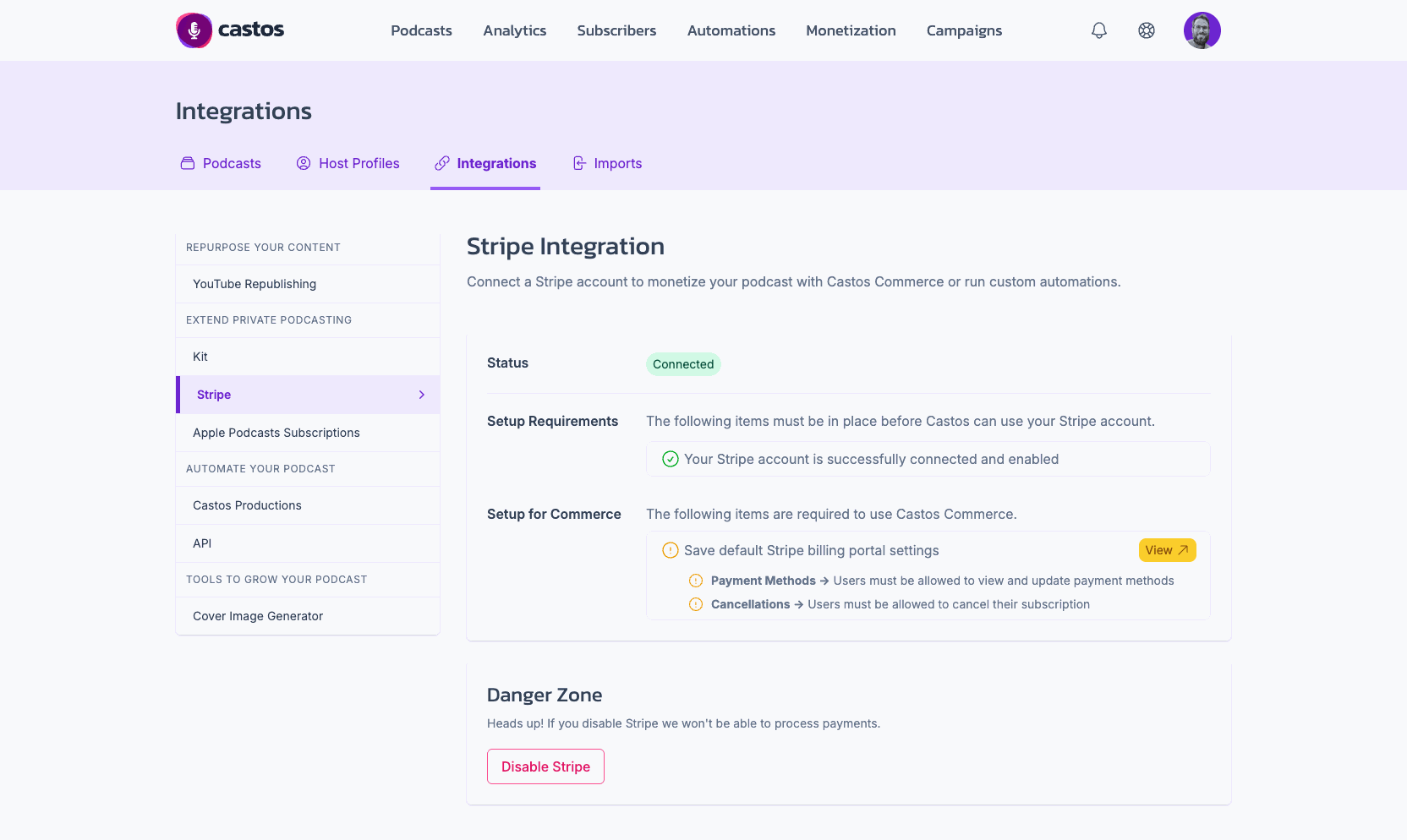
Open the Stripe integration page in your Castos dashboard and complete the one-click connection. If you do not have a Stripe account yet, one is free to create at stripe.com.
2. Create your product in Stripe
In Stripe, set up what you are selling: a recurring monthly subscription, or a one-time payment for something like back-catalog access. This is where you set the price.
3. Put the checkout link where your listeners already are
Every Stripe product comes with its own checkout page. Add that link to your website, or to your Castos podcast website, wherever people already go looking for your show.
You can also drop it into your feed’s funding tag. Castos supports the Podcasting 2.0 tag set, and apps that read the funding tag show it as a support link next to your show.
4. Automate access
Use the payment event as the trigger in Castos to add the new supporter as a subscriber. Stripe offers several trigger options, so you can match the automation to how you have priced things. Once this is set, nobody has to be added by hand and nobody waits on you to notice their payment.
5. Ask, in the episode
This is the step people skip, and it is the one that decides whether any of the rest matters. Say it out loud in an episode people liked, in the same plain voice you use for everything else. Show notes alone will not do it.
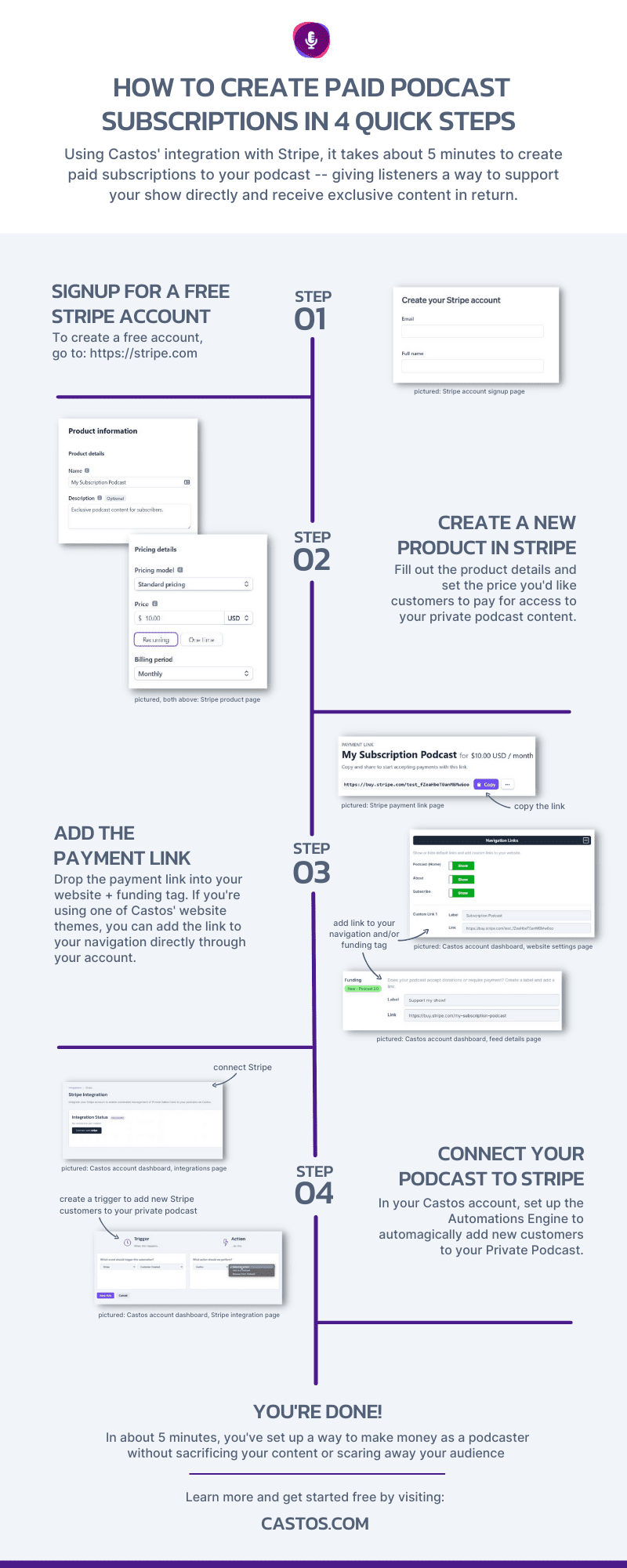
The setup itself, end to end. The connecting and configuring takes about five minutes; deciding what to offer is the part worth spending time on.
What it costs
Castos does not take a percentage of what your listeners pay you. There is no platform cut and no per-subscriber charge inside your plan’s limit. That is the meaningful difference from membership platforms, which typically charge a platform fee on top of payment processing.
Stripe’s own processing fees still apply. Stripe is the payment processor, those fees are theirs, and they are published on Stripe’s pricing page. Anyone telling you that taking money online is free is skipping that line.
Paid subscriptions are included on every paid Castos hosting plan, which start at $19 a month. Private subscribers are capped by plan: up to 100 on Essentials, 250 on Growth, and 500 on Pro. Twenty subscribers, or two hundred, fits inside the entry plan without an upgrade.
Two other ways listeners can pay
Apple Podcasts. If your audience lives in the Apple Podcasts app, Apple Podcasts Subscriptions works with Hybrid Podcasting and offers the same benefits inside the app your listeners already use. Apple’s own terms apply to purchases made there.
Your email list. If you already run your audience through Kit, the Castos Kit integration grants podcast access from a tag or custom field, so joining a list or buying through your existing checkout can hand someone their episodes automatically. For anything else, Zapier covers the same “when this happens, do that in Castos” pattern.
Frequently asked questions
Do I need a second podcast to charge for episodes?
No. With Hybrid Podcasting the paid episodes live in the show you already publish. Your listeners subscribe once, and you decide which episodes require access.
Does Castos take a cut of subscription revenue?
No. Castos charges no platform fee and no per-subscriber fee inside your plan’s subscriber limit. Stripe charges its standard payment processing fees, which are published on Stripe’s pricing page.
How does a listener get access after paying?
Automatically. The completed Stripe payment triggers Castos to add that person as a subscriber, and they get access without waiting for you to do anything.
Start with one benefit
The setup takes an afternoon at most, and most of that is deciding what to offer rather than connecting anything.
Pick the one thing your show already makes that people would pay for. Put a price on it. Then tell your listeners it exists, more than once.
See how a paid feed works, or connect your account from the Stripe integration page.
Launch Your Podcast In Minutes
Castos makes launching simple with one-click setup, automatic distribution to all platforms, and professional hosting. No technical skills required.
Start your 14-day free trial