Your podcast on YouTube, without lifting a finger
Every public episode you publish shows up on your YouTube channel as a video, ready to be found by millions of people who never open a podcast app.
Included on Growth and up · 14-day free trial · Cancel anytime
- Publish once
- Live on YouTube automatically
- Get found in search
- Reach a whole new audience
Podcasts that publish with Castos





















A second audience, no extra work
Connect your channel once. From then on, every public episode does double duty.
-
Keep publishing the way you do now
Upload your episode to Castos and hit publish. There's no video to edit, no second upload, and nothing new to learn.
-
Your episode becomes a video on its own
Castos pairs your audio with your episode art and publishes the video to your channel, with chapters in the description so viewers can jump right in.
-
Get discovered by people searching your topic
YouTube is where people go looking for answers. Every episode becomes a video that can turn up in YouTube and Google search, sending new listeners your way.
-
Grow an audience beyond podcast apps
Reach people who would never open a podcast app, and turn them into viewers, subscribers, and fans of your show.
Everything you need to grow on YouTube
YouTube Republishing is included on Growth and up, with no per-video fees.
-
Automatic publishing
Every new public episode goes to your YouTube channel shortly after it goes live. Private and subscriber-only episodes never do.
Growth and up -
Video made from your audio
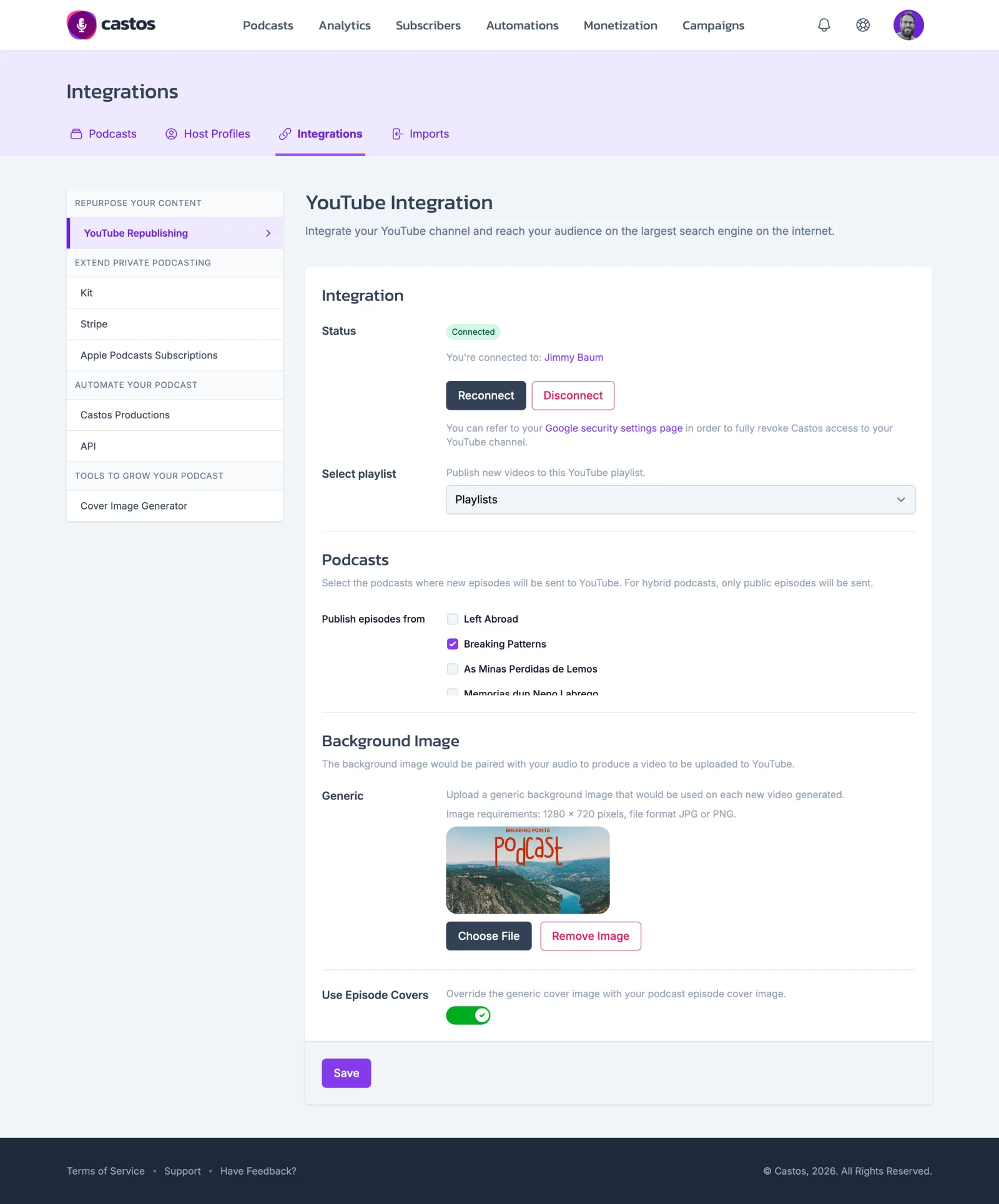
Castos builds each video from your audio and your episode cover, or a background image you upload once.
Growth and up -
Chapters in the description
When an episode has chapters, their timestamps go into the video description so viewers can skip to the part they want.
Growth and up -
The playlist you choose
Send new videos to a playlist of your choice and keep your channel organized without touching it.
Growth and up -
Pick which shows publish
Host several podcasts? Choose exactly which ones go to your channel.
Growth and up -
Already making video?
Host your video episodes on Castos and they go to YouTube as they are, alongside your audio feed.
Pro
Set it up once
Connect your channel, pick a playlist and the shows to publish, and choose a background image or your episode covers. Castos handles every episode after that.
What podcasters say about Castos
I appreciate the easy monetization of podcasts through Castos, which allows me to make money right away. The one-click distribution to every platform is particularly beneficial, saving me time and effort by simplifying the process and expanding my reach effortlessly.

Content Manager & Podcast Host
As a podcaster, I've been a Castos customer for four years and have nothing but good things to say about the company. My shows upload quickly, and the customer service is especially great. On the rare occasion that I've needed support, staff responds personally to submitted technical inquiries in a timely fashion.

Podcast Host
Related features
YouTube Republishing questions
Which plans include YouTube Republishing?
Do I need to make a video?
Which episodes are published to YouTube?
What goes in the video description?
Can I choose where videos go on my channel?
Can I disconnect my channel later?
Put your podcast in front of a whole new audience
YouTube Republishing is included on Growth and up. Start a 14-day free trial and cancel anytime.