How to See Where Your Podcast Listeners Are Located

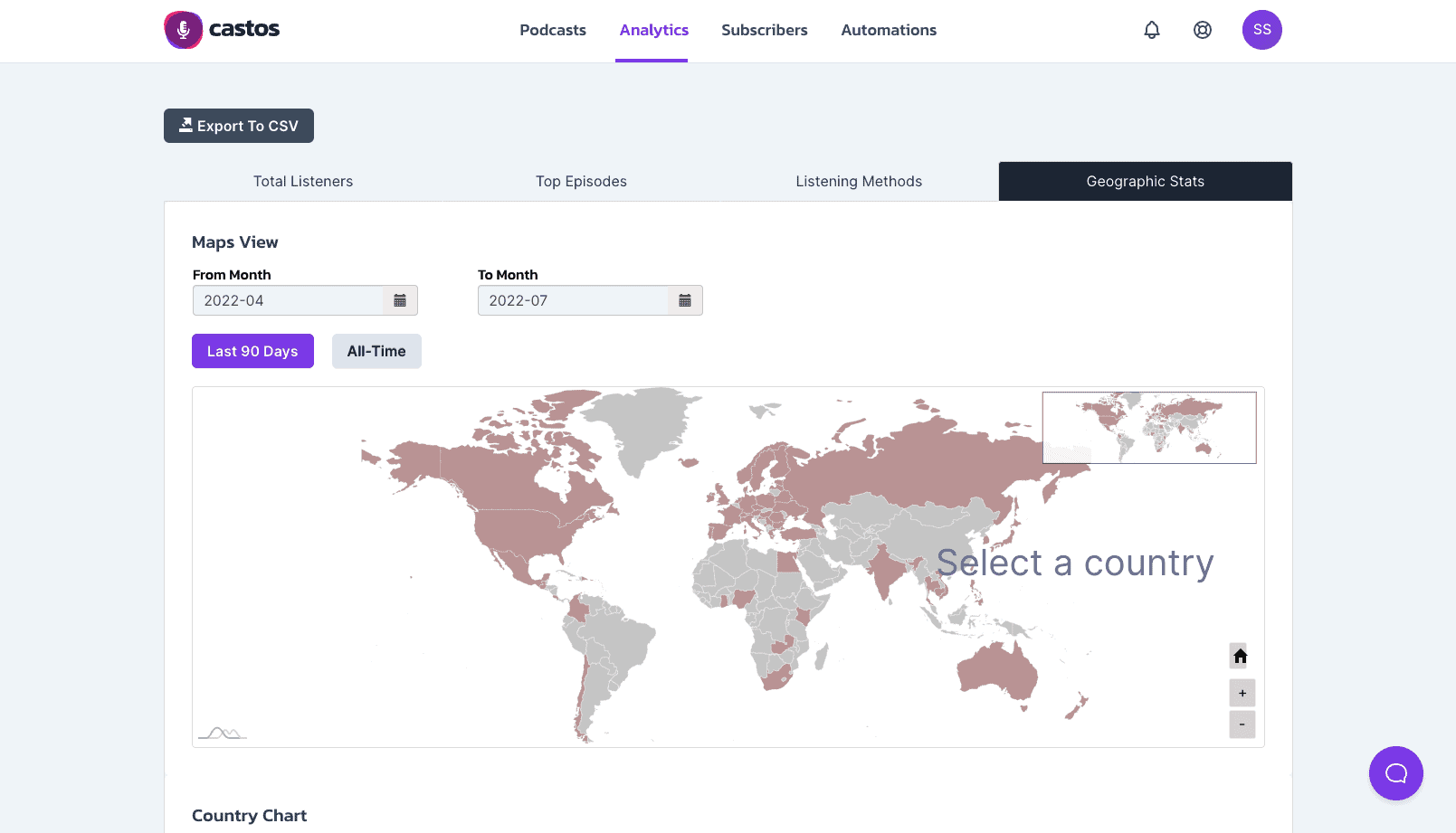
To see where your podcast listeners are located, open your podcast host’s geographic analytics report. It maps episode downloads to country and city using each listener’s IP address. In Castos, that’s the Geographic Stats tab inside your analytics dashboard, where an interactive map lets you drill from countries down to individual cities and filter by any date range.
That’s the short answer. Here’s how to actually use it, and where the data comes from, so you know how far to trust it.
Where to find listener location in Castos
- Log in to your Castos account and click Analytics in the top-right of your dashboard.
- Select the Geographic Stats tab.
- You’ll see an interactive world map of your downloads. Click into any country to drill down to the cities your listeners are in, and adjust the date range to see how your footprint shifts over time.
If you’re on a Growth or Pro plan with Advanced Analytics, you can also export the geographic breakdown as a PDF by city or country, handy for a sponsor deck or a stakeholder update. The full walkthrough lives in our understanding your podcast analytics guide.
Where the location data comes from (and how accurate it is)
Podcast location data is derived from the IP address attached to each download request. IP addresses map reliably to a country and, most of the time, to a city.
I want to be straight about the limits, because I see people over-read this data. It’s an approximation, especially at the city level:
- VPNs can place a listener in a city they’ve never visited.
- Corporate and university networks can bunch many listeners under one location.
- City-level accuracy is good, not surgical.
So treat geographic stats as a strong directional signal, “a real and growing share of my audience is in the UK,” rather than a precise census. In my experience that directional read is more than enough to make good decisions, as long as you don’t kid yourself that it’s exact.
What to actually do with it
Location data is one of the most actionable metrics in podcasting, and it’s underused. A few ways I’d put it to work:
- Live events and meetups. Planning a live show? Start with the cities where you already have the most listeners. You’re not guessing at demand. You can see it.
- Local and regional sponsorships. This is a quietly powerful pitch. If a regional brand can see that thousands of your listeners are in their exact market, you’ve turned a “small” audience into a targeted one, and targeted usually pays better per listener than broad.
- Release timing and language. A big chunk of listeners in another time zone or country might change when you publish, whether you add transcripts, or how you localize references.
- Spotting growth. Watching your map change over months tells you whether a marketing push or a guest actually moved the needle in a new region.
Honestly, if I could get a new podcaster to look at just two reports, it’d be their unique listeners and their geographic stats. Together they tell you how many real people listen and where they are, which is most of what you need to make smart calls about growth and monetization.
Do Apple and Spotify show location too?
They show some. Apple Podcasts and Spotify both report geographic data for listening that happens inside their own apps, a useful slice but only a slice. Your host’s geographic report is the only place you see location across every app and directory at once, which is why I treat it as the source of truth and use the platform dashboards for extra in-app detail.
The bottom line
Where your listeners live is sitting in your analytics right now, in your host’s geographic report: country and city, filterable by date. In Castos it’s the Geographic Stats tab. Read it as a directional signal, then use it for events, local sponsorships, timing, and tracking growth.
Want to see your audience on a map? Start a free 14-day Castos trial and open Geographic Stats on day one.
Launch Your Podcast In Minutes
Castos makes launching simple with one-click setup, automatic distribution to all platforms, and professional hosting. No technical skills required.
Start your 14-day free trial